
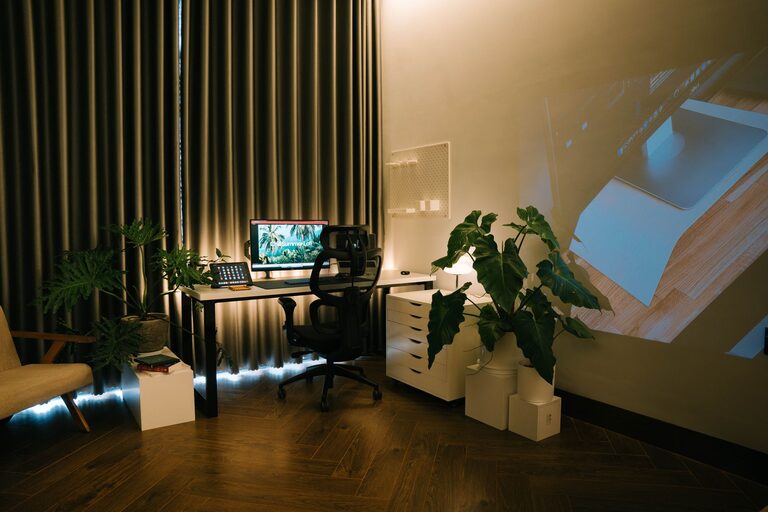
Creating a relaxing home workspace is essential for maintaining focus and reducing stress, especially when many of us spend hours working from home. A well-designed workspace not only enhances productivity but also promotes a sense of calm and well-being. In this post, we’ll explore practical steps and tips to help you transform your home office into a peaceful, inviting space.
Why a Relaxing Workspace Matters
Your environment has a huge impact on your work performance and mood. A cluttered or uncomfortable space can lead to distractions, fatigue, and frustration. On the other hand, a relaxing workspace can help:
– Increase concentration and creativity
– Lower stress levels throughout the day
– Improve overall work satisfaction
– Encourage better posture and comfort
Now, let’s dive into how you can create that ideal setup at home.
Choose the Right Location
Find a Quiet, Well-Lit Spot
Look for a space in your home that is quiet and shielded from distractions such as TV noise or heavy foot traffic. Natural light is a big plus, as it improves mood and reduces eye strain. If natural light isn’t an option, invest in good-quality lighting that imitates daylight.
Consider Privacy and Boundaries
If possible, select a spot where you can close a door or create a visual boundary separating your work area from the rest of the home. This separation helps your brain switch between work mode and relaxation mode more easily.
Invest in Comfortable, Functional Furniture
Ergonomic Chair and Desk
Comfort is key for long hours at your desk. Choose a chair that supports your lower back and encourages good posture. Your desk should be at a height where your elbows form a 90-degree angle while typing.
Desk Organization Tools
Keep your workspace tidy by using organizers such as drawers, trays, or cable management solutions. A clutter-free desk reduces stress and helps you focus better.
Personalize Your Workspace Without Overdoing It
Add Calming Colors and Decor
Soft, neutral tones like blues, greens, or earth tones promote relaxation. Avoid overly bright or harsh colors that can cause visual fatigue. Adding plants can also bring a sense of calm and improve air quality.
Display Inspirational Items
Place photos, quotes, or art that motivate and uplift you, but keep it minimal to avoid distractions.
Optimize Lighting and Screen Setup
Avoid Glare and Eye Strain
Position your computer screen perpendicular to windows to reduce glare. Use adjustable lighting to create a comfortable working environment.
Take Breaks for Your Eyes
Follow the 20-20-20 rule: every 20 minutes, look at something 20 feet away for at least 20 seconds. This simple habit helps reduce eye strain.
Incorporate Relaxation Elements
Sound Control
Use noise-canceling headphones, white noise machines, or play soft instrumental music to drown out distractions.
Aromatherapy
A subtle scent like lavender or eucalyptus can make your workspace feel more inviting and calm.
Maintain a Daily Routine and Clean Workspace
Start with a Morning Ritual
Begin each day by organizing your desk and setting clear goals. A tidy space primes your mind for productivity.
End of Day Cleanup
Spend a few minutes clearing your workspace at the end of your workday to prepare for tomorrow and help you mentally disconnect.
Tips for Staying Relaxed While Working
– Take regular short breaks to stretch and move.
– Keep a water bottle nearby to stay hydrated.
– Practice deep breathing exercises if you feel overwhelmed.
Final Thoughts
Creating a relaxing home workspace doesn’t require a complete overhaul. By paying attention to lighting, comfort, organization, and personal touches, you can build an environment that encourages focus and reduces stress. Remember, the goal is to design a space where you feel calm and productive every day. With these tips, you’re well on your way to making your home office a true sanctuary for work.
